Critical infrastructure
A comprehensive security system for a critical infrastructure site
A single digital platform that combines access control, video surveillance, AI analytics, IoT sensors, alarm management and event logging — for the protection and continuous operation of the site.
site status monitoring
areas of security modernisation
instead of disparate systems
Project objective
Not a set of separate systems, but a single managed complex
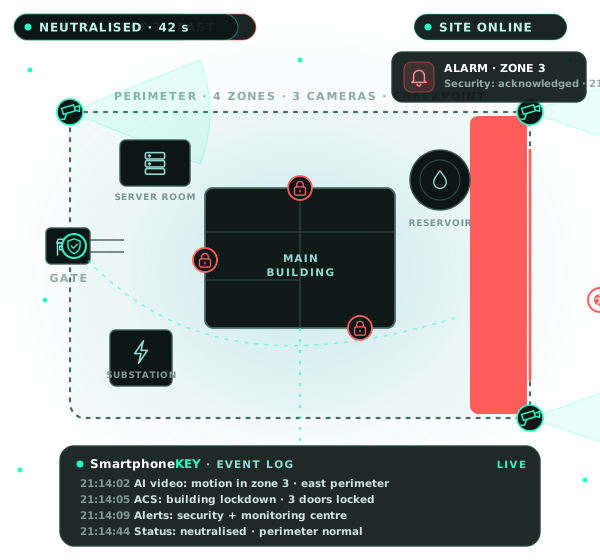
A modern critical infrastructure site needs not a set of separate security systems, but a single managed complex able to prevent, detect and record potentially dangerous events.
SmartphoneKEY offers a comprehensive modernisation of the site’s security system: all key subsystems are combined into one digital platform with a single event history and control centre.
The goal is to move from reacting after an incident to preventing and automatically detecting potential threats.
SmartphoneKEY combines
- Access control
- Video surveillance
- AI video analytics
- IoT sensors
- Engineering systems control
- Vehicle access management
- Centralised monitoring
- Automatic alerts
- Event logging
- Redundancy of critical functions
Modernisation result
Five effects for your site
A single digital platform raises the level of protection and continuity of the site’s operation.

Higher level of protection

Fast incident detection

Less human error

Business continuity

Centralised control
What we improve on site
10 areas where SmartphoneKEY delivers results
Each area has specific capabilities and a measurable effect — from the perimeter to centralised management.

1. Perimeter control
- Control of all entry points
- Control of gates and barriers
- Vehicle identification
- Video confirmation of entries
2. Access to premises
- Personal digital access rights
- SmartphoneKEY / QR / RFID
- Access by schedule and zone
- Instant blocking of lost keys
3. Video & AI analytics
- AI analysis of the video stream
- Detection of people, vehicles and events
- Monitoring of defined zones
- Automatic alarm events
4. Alarms & response
- Centralised alarm management
- Automatic response scenarios
- Push / SMS and other alerts
- Interaction with access control, video and engineering systems
5. Logging & audit
- Single event log
- Recording of date, time and user
- Search and filtering
- Event history of all connected systems
6. Engineering systems & IoT
- Access control, video and IoT in one system
- Equipment status monitoring
- Detectors and sensors
- Automated scenarios
7. Transport & logistics
- Vehicle identification
- Control of authorised vehicles
- Log of entries and exits
- Management of gates and barriers
8. Redundancy & fault tolerance
- Server redundancy
- Backup communication channels
- Autonomous operation of individual nodes
- Data protection and backup
9. Centralised and remote control
- Single control panel
- Real-time system status
- Remote control of authorised devices
- Role-based operator rights
10. Analytics & reporting
- Event analytics
- Security system KPIs
- Statistics and trends
- Automatic reports
Key management
Solving the “one key — everywhere” problem
From an uncontrolled physical key — to personal managed digital access.
Traditional physical key
- A key can be handed to someone else — there’s no guarantee who uses it
- No precise identification: it’s hard to tell who opened the door and when
- A lost key can’t be blocked instantly — the key or lock has to be replaced
- No time control: the key works regardless of the schedule
- No full usage history or digital entry log
- Once a key is handed over, control over it is effectively lost
SmartphoneKEY: managed digital access
- Remote issuing of a digital key without handing over a physical carrier
- Flexible management of access rights to specific zones
- Access by time and schedule: days, hours, validity period
- Instant remote revocation of access
- Full event history of digital access use
- Personal identification: you know who used access and when
Digital key lifecycle
Creation
Issuing
Use
Rights change
Blocking
Audit
Contractors & temporary staff
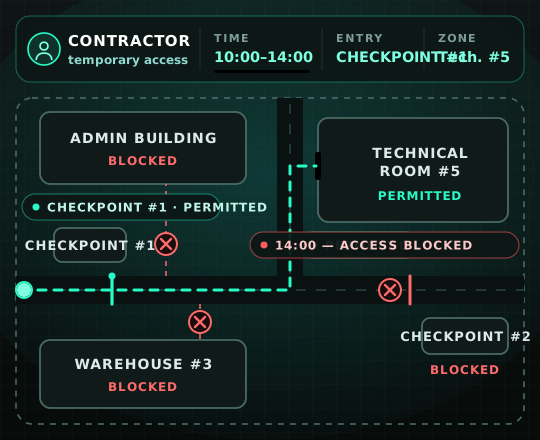
Access lasts exactly as long and exactly where it’s needed
Personal access only to defined zones, at a defined time and for a specific task. Temporary access doesn’t turn into permanent uncontrolled access.
Service companies
Repair crews
Contractors
Drivers
Suppliers
Visitors
Temporary staff
Automatic access expiry
How it works
Creating access
Setting rights
Issuing the key
Control
Auto-expiry
Next-level video surveillance
From a passive archive — to active video control
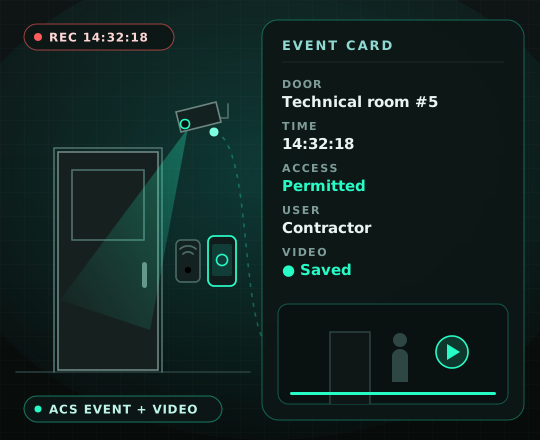
Every significant access event can have visual confirmation: who, where, when, what happened — and a video clip for it.
- Event — the system automatically records a significant action
- Identification — you know whose digital access was used
- Video confirmation — the matching video clip is available for the event
- Quick check — no need to manually search for the moment in hours of archive
Traditional video surveillance
- The camera only records to an archive
- The operator views the recording after the event
- Something happened — manual search for the right moment
SmartphoneKEY — the active model
- Camera → AI analysis → event → alert → response
- The video clip is automatically attached to the access control event
- Event, user, time and video — in one card
AI video analytics
The operator doesn’t have to watch dozens of cameras at once
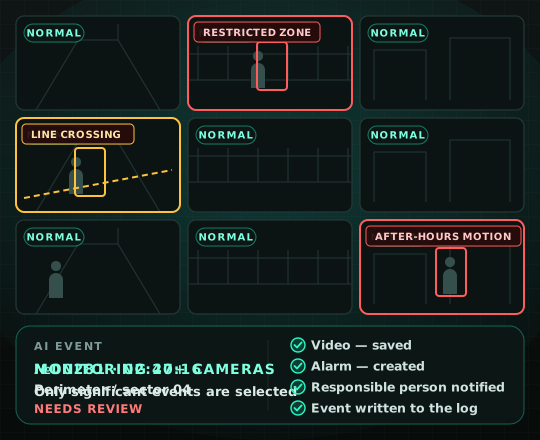
The system analyses video streams and automatically highlights events that need the operator’s attention.
What AI can detect
A person in a restricted zone
Motion in a controlled zone
Crossing a virtual line
Loitering in a zone
Crowds of people
An abandoned object
Unusual activity
An open door
A person near critical equipment
Motion outside working hours
How the AI event detection process works
Capture
Video saved
Alarm created
Alert
Event log
IoT monitoring 24/7
Control not only of people, but of infrastructure status
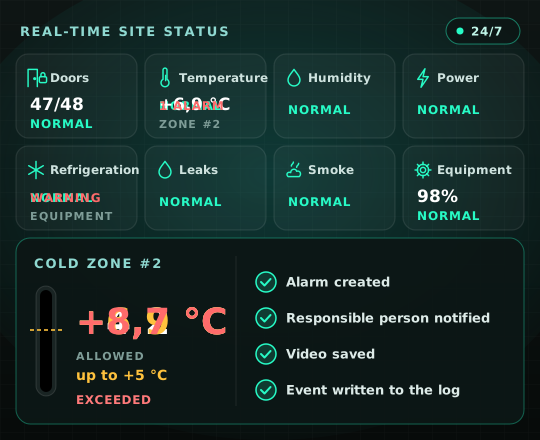
Sensors and engineering systems send data on the status of critical infrastructure to the single SmartphoneKEY centre. Any parameter exceeding its limits immediately becomes an alarm with an alert and a log entry.
- Doors — open / closed
- Temperature — set ranges
- Humidity — humidity level
- Motion — activity in zones
- Smoke — sensor signals
- Equipment — operating and fault statuses
- Power supply — availability and status
- Refrigeration equipment — temperature and mode
- Leaks — sensor signals
- Engineering parameters — per configuration
Without centralised IoT control
- Separate sensors and separate systems
- Manual checking of readings
- Risk of detecting a problem too late
SmartphoneKEY + IoT
- Sensors → single system → automatic detection
- Alerts to responsible persons and response control
- A single digital picture of the site’s status 24/7
Transport security
Digital vehicle control on the site
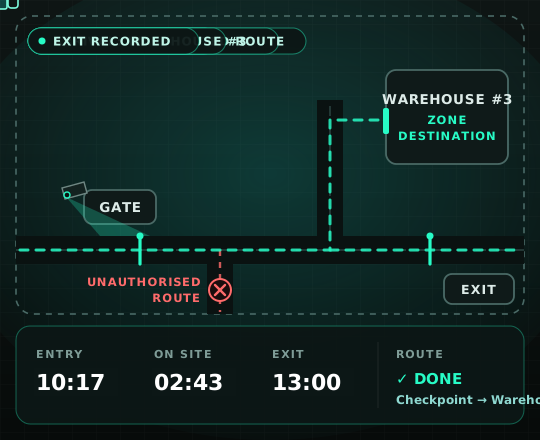
From entry to exit, every authorised vehicle event is recorded in the single SmartphoneKEY system.
What SmartphoneKEY controls
- Entry — recording the vehicle event at the entrance
- Exit — recording the time of leaving the site
- Gates — status and permitted opening scenarios
- Barriers — passage through controlled points
- Driver — linking the permit to a specific driver
- Permit — checking the validity of vehicle access
- Time on site — entry, stay and exit
- Route — permitted zones and route
Checkpoint passage scenario
Arrival at the checkpoint
Identification
Permit check
Video recording
Barrier opening
Moving to the zone
Exit recorded
Full digital history
Before and after modernisation
From disparate systems — to a single digital circuit
Modernising not individual equipment, but the site’s whole security management model.
Before modernisation
- Disparate systems — each works separately
- Manual control: many processes depend on staff
- Physical keys are hard to control and block
- Passive video — archive review after the event
- No single event history
- No link between access control + video + IoT
- Complicated temporary access for contractors
- High dependence on human factors
- No single dashboard — a fragmented picture of the site’s status
After implementing SmartphoneKEY
- A single digital system — data and events in one circuit
- Personalised access — only defined rights
- Centralised issuing, changing and revoking of keys
- Access events linked to video
- AI video analytics automatically detects defined events
- IoT monitoring of site status parameters
- Automatic alarms: detection → alert → response
- A complete centralised action log
- Separation of rights: who has access where and when
- A single control centre in one dashboard
- Redundancy of critical components
8 key functions
How SmartphoneKEY helps your site
From preventing a potential threat — to detection, confirmation, response and centralised management.
- One system for access control, events, video, IoT, alarms and site management
- A shift from passive observation to a managed security model
- A shorter path from detecting an event to responding
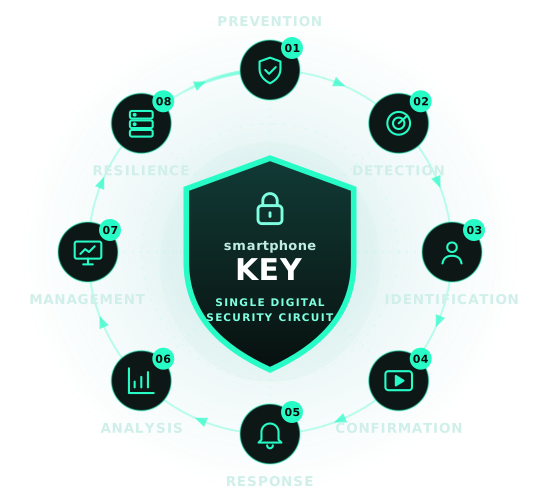

01 · Prevent

02 · Detect

03 · Identify

04 · Confirm

05 · Respond

06 · Analyse

07 · Manage

08 · Ensure resilience
Our goal
Not just to install equipment, but to create a system where every critical event is controlled, recorded and passed on to the people responsible
Control
Detection
Response
Analytics
Continuity
FAQ
Frequently asked questions
Didn’t find an answer? Leave a request — a SmartphoneKEY specialist will discuss your site’s objectives.
In SmartphoneKEY, access control, video surveillance, AI analytics, IoT sensors, transport and alarms work as a single digital circuit: events are combined and share one history, and the operator sees the situation on site in one interface.
A personal SmartphoneKEY digital key, QR and RFID. Access rights are configured by zone and schedule.
A digital key can be deactivated remotely in an instant — without replacing locks or physical carriers. The full usage history of the key is kept in the log.
The administrator creates a personal digital key and sets the time, checkpoint and permitted rooms. The system records entries, and when the interval ends, access is blocked automatically.
A person in a restricted zone, motion in a controlled zone, a virtual line crossing, loitering, crowds, an abandoned object, unusual activity, an open door, a person near critical equipment and motion outside working hours.
Yes. A matching video clip is attached to every significant access event: the operator sees who used access, where and when, without manually searching the archive.
Door status, temperature, humidity, motion, smoke, equipment status, power supply, refrigeration equipment and other engineering parameters according to the site’s configuration.
The system automatically creates an alarm and sends an alert to the responsible person — via Push, SMS or another channel. Response scenarios interact with access control, video and engineering systems.
Entry and exit, the vehicle, driver, permit, time on site and route are recorded. Barriers and gates open only under permitted scenarios, and every event has video confirmation.
Server redundancy, backup communication channels, autonomous operation of individual nodes and data protection keep critical security functions running even when individual components fail.
Yes. Role-based rights define what each operator sees and controls, and user access rights define who can pass where and when.
Event analytics, security system KPIs, statistics and trends, automatic reports — data for risk assessment and management decisions.
Request
Let’s discuss protecting your site
Leave your contacts — a SmartphoneKEY specialist will get in touch to discuss your site’s objectives and the format of the security modernisation.
- A single digital security circuit
- Personalised access and contractor control
- AI video analytics and IoT monitoring 24/7
- Redundancy of critical functions